
XCTest & XCUITest test reporting
A practical guide to reporting iOS test results: what Xcode actually writes — a binary
.xcresult bundle, not JUnit-XML — how to upload
that bundle directly with no conversion step, when a conversion is still the right answer, CI
patterns for macOS runners, and how to add
hosted, historical analysis —
AI failure clustering, flaky-test scoring, and per-launch risk — on top with
Qualflare.
Worth saying up front: Qualflare doesn’t run your XCTest or XCUITest suite. It’s a results and observability layer, not a simulator or device farm — it ingests whatever results file your existing CI, simulator run, or device cloud already produced.
How XCTest and XCUITest results actually work
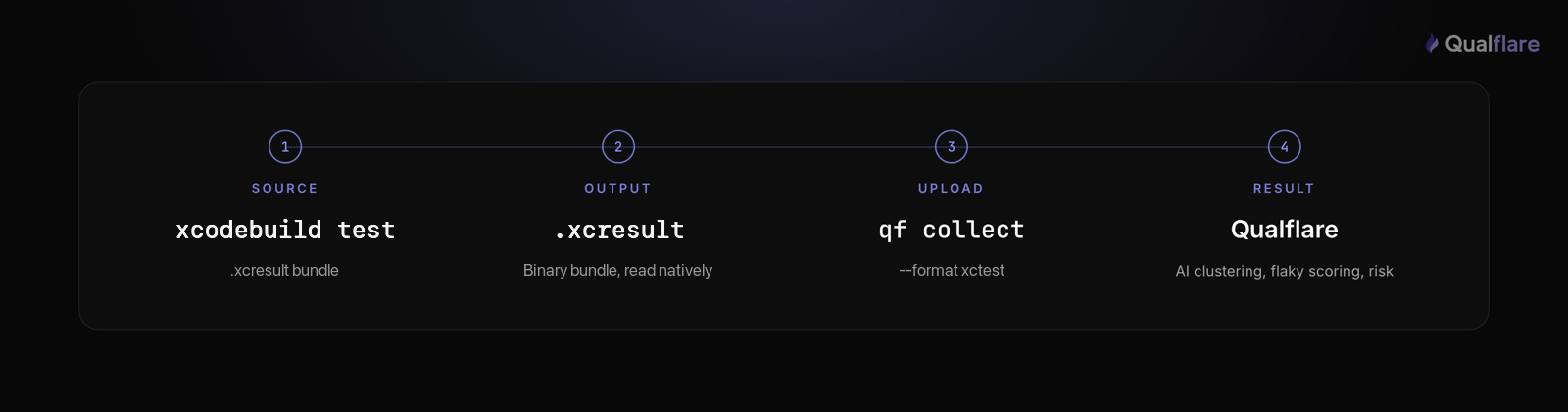
XCTest is Apple’s unit- and integration-testing framework; XCUITest is the UI-testing layer built
on top of it for driving a running app through the accessibility tree. Both run the same way —
through Xcode’s build system, via xcodebuild test —
and both produce the same output format:
an .xcresult bundle,
a binary, database-like package, not XML.
# Run the suite and produce a result bundle
xcodebuild test \
  -scheme MyApp \
  -destination 'platform=iOS Simulator,name=iPhone 15' \
  -resultBundlePath TestResults.xcresult
That bundle is not something most CI reporting tools — or Qualflare — can read directly. Apple’s
own xcresulttool is the sanctioned way to pull
data out of it, but the interface changed under Xcode 16: the long-standing
get object subcommand was deprecated and now
requires a --legacy flag, replaced by a new
get test-results subcommand family (
summary,
tests,
activities). Developers reported rough edges
during the transition — notably an initially unpublished schema for the new JSON output, raised on
Apple’s developer forums —
and it’s a reminder that anything built against the old interface needs to keep up:
# Xcode 15 and earlier — deprecated in Xcode 16 (needs --legacy now)
xcrun xcresulttool get object --legacy --path TestResults.xcresult --format json
# Xcode 16+ — the replacement subcommand family
xcrun xcresulttool get test-results summary --path TestResults.xcresult
xcrun xcresulttool get test-results tests --path TestResults.xcresultEither way, what comes out is JSON in Apple’s own schema — still not the JUnit-XML that CI dashboards and platforms like Qualflare consume. That gap is this page’s central topic.
Converting .xcresult to JUnit-XML: what to actually use
For years, the default converter was the fastlane-community/trainer Ruby
gem. It isn’t a safe recommendation anymore: its last release shipped in 2019,
and its commit history shows nothing but a dependency bump since November 2021.
It predates the Xcode 16 xcresulttool changes
above entirely, so it’s built against a CLI interface Apple has since replaced.
The actively maintained alternative is a7ex/xcresultparser —
latest release 2.2.0, shipped July 2026,
with releases landing every few months. It reads an .xcresult bundle
directly and writes JUnit-XML in one step — no intermediate JSON, no schema wrangling:
# Only needed when the upload runs somewhere without Xcode:
# convert on the macOS job, upload the XML from the other one
xcresultparser -o junit TestResults.xcresult > junit.xml
That junit.xml is what you hand to any
JUnit-XML-consuming tool — Qualflare included. It’s installable via Homebrew
(brew install a7ex/homebrew-formulae/xcresultparser)
or as a prebuilt binary from its GitHub releases, so adding it to a macOS CI runner is a one-line step.
CI patterns: GitHub Actions, Xcode Cloud, Bitrise-style CI
GitHub Actions (macOS runners). Run the suite, convert the bundle, upload — always, even on failure, since a failing run is the one you most need reported:
# .github/workflows/ios-tests.yml
ios-tests:
  runs-on: macos-14
  steps:
    - uses: actions/checkout@v4
    - name: Run XCTest / XCUITest suite
      run: |
        xcodebuild test \
          -scheme MyApp \
          -destination 'platform=iOS Simulator,name=iPhone 15' \
          -resultBundlePath TestResults.xcresult
    - name: Convert .xcresult to JUnit-XML
      if: always() # produce a report even when tests fail — that's the point
      run: |
        brew install a7ex/homebrew-formulae/xcresultparser
        xcresultparser -o junit TestResults.xcresult > junit.xml
    - name: Upload results to Qualflare
      if: always()
      run: qf myapp collect junit.xml --format xctest
Xcode Cloud. Xcode Cloud already produces an
.xcresult bundle for every workflow and exposes
its path via the CI_RESULT_BUNDLE_PATH environment
variable in a post-action script — convert and collect from there:
# ci_post_xcodebuild.sh — Xcode Cloud post-action script
# Xcode Cloud already writes an .xcresult bundle to $CI_RESULT_BUNDLE_PATH
xcresultparser -o junit "$CI_RESULT_BUNDLE_PATH" > junit.xml
qf myapp collect junit.xml --format xctest --branch "$CI_BRANCH" --commit "$CI_COMMIT"
Bitrise and similar mobile CI. Same shape: an Xcode Test
step (or a raw xcodebuild test -resultBundlePath script
step) produces the bundle, a script step installs and runs
xcresultparser, and a final step runs
qf collect on the resulting XML. The principle
holds across every platform: run the suite, convert the bundle,
upload the XML — in that order, on every run.
Common XCTest/XCUITest reporting problems (and fixes)
None of this is a niche complaint — mobile build instability is measurably rising. The Bitrise Mobile Insights Report 2025 found the share of teams experiencing any test flakiness grew from 10% to 26% between 2022 and 2025, and the same report found teams using monitoring tools see 25% fewer flaky reruns. The issues below are the specific, iOS-flavored version of that trend.
- No .xcresult bundle at all after a crash. If the test
process crashes mid-run — a segfault in the app under test, an XCUITest host-app timeout — Xcode
can fail to finalize the result bundle, leaving nothing for
xcresultparserto read. Check the job for a non-zeroxcodebuildexit combined with a missing bundle path, and treat it as its own failure signal rather than a silent gap in the report. - Simulator boot-time variance inflates or times out CI runs. Simulator
boot time on shared CI runners is inconsistent — cold caches, resource contention with parallel
jobs — and a suite that boots the simulator per-target can lose minutes to variance alone. Boot
and warm the simulator once before the test step, and give
xcodebuild testa generous-resultBundlePath-writing timeout so a slow boot doesn’t get mistaken for a hung test. - XCUITest element queries are flaky by nature. XCUITest waits on the accessibility tree, and animations, network-dependent view state, or slightly different simulator timing between runs produce intermittent “element not found” failures that have nothing to do with the feature under test. This is exactly what a flaky-test score computed from history — not a single run’s pass/fail — is for; see “what you get” below.
- Xcode-version mismatches break bundle parsing. An
.xcresultbundle produced by one Xcode version isn’t guaranteed to parse cleanly with a converter built against a different one — a developer running Xcode 15 locally and CI running Xcode 16 (or vice versa) is a common source of “it works on my machine, not in CI.” Pin the Xcode version in CI (xcode-select/xcodes) to match what generated the bundles you’re testing conversion against. - The results file never reaches the upload step. The
same ordering mistake as any framework: if the conversion or upload step doesn’t run
if: always()(or the equivalent “run even on failure” setting on your CI platform), a failing test run — the one you most need visibility into — produces no report at all.
Send XCTest/XCUITest results to Qualflare
On macOS there is no conversion step. Point the CLI at the bundle and it reads it with Apple’s own
xcresulttool:
# Upload the bundle itself — the CLI reads it with xcresulttool
qf myapp collect TestResults.xcresult
No --format needed:
.xcresult is a recognised input, and the CLI handles
the fact that a bundle is a directory rather than a file. What comes back is each test’s
status and duration plus its activities as steps, which is
more than a converted JUnit-XML file can carry — the format has no notion of a step. Measured on a
real bundle: three tests in, one failed with its two activities attached, one passed, one skipped,
each status mapped correctly.
Attachments and retry history come through too, from
qf 0.1.31. Anything a test attached with
XCTAttachment arrives with its bytes — a screenshot
is uploaded as an image, and the manifest marks which attachments belong to a failure. If the run used
-retry-tests-on-failure, each repetition arrives as
its own attempt with its result, duration and message, so a test that failed and then passed is
reported as flaky with its failure intact rather than as a plain pass.
One real limit remains: xcresulttool ships with
Xcode, so the upload has to run on the macOS job — which is where your iOS tests already run.
Authenticate the CLI once with your Qualflare access token, stored as a CI secret — see the
CLI docs.
When you still need a JUnit-XML conversion
One case: the upload runs somewhere without Xcode — a Linux job that collects artifacts from several
platforms, say. Convert on the macOS job, then upload the XML from wherever you like, passing
--format xctest so the launch is still labeled
correctly. That path routes through the same JUnit-XML-compatible ingestion as every other XML
framework, and it loses the steps.
# Only needed when the upload runs somewhere without Xcode:
# convert on the macOS job, upload the XML from the other one
xcresultparser -o junit TestResults.xcresult > junit.xml
# Upload the converted JUnit-XML — tell the CLI the format explicitly
qf myapp collect junit.xml --format xctestWhat you get on top of raw .xcresult data
- AI failure clustering. When a backend change breaks 20 XCUITest flows across screens, Qualflare groups them by root cause so you triage a handful of clusters instead of 20 stack traces.
- Flaky-test scoring from history. Because XCUITest’s element-query timing issues rarely show up as a clean pass/fail in a single run, Qualflare scores each test’s flakiness across CI runs — separating genuinely unstable tests from one-off simulator hiccups.
- Per-launch risk. Every CI run becomes a “launch” with a risk rating, the failing areas, and recommended next steps — a ship / don’t-ship signal that arrives with the results.
- History & trends. Pass rate and flakiness over time across branches and Xcode versions — the aggregation a per-run
.xcresultbundle can’t give you on its own. - Context & defects. Failures keep their names and messages from the converted JUnit-XML, and you can spin up a defect straight from a failing run.
Raw .xcresult bundle vs Qualflare
| .xcresult bundle | Qualflare | |
|---|---|---|
| Readable without Xcode / xcresulttool | — | Yes |
| History across CI runs | — | Yes |
| AI failure clustering (root cause) | — | Yes |
| Flaky-test scoring over time | — | Yes |
| Local, zero-setup, offline | Yes | — |
| Full trace, logs & attachments per failure | Yes | Via linked CI artifact |
They’re complementary: keep the raw bundle (or an exported .xcarchive) for deep local debugging, add Qualflare for hosted, historical CI observability across every run.
Get AI analysis on your iOS test runs
Start free — convert your .xcresult bundle, run qf collect, and get your first AI analysis in minutes.
Building out Android coverage too? See Espresso test reporting (JUnit-XML natively, no conversion) or Maestro test reporting for cross-platform E2E flows, and how to get Espresso, XCTest, and Maestro into one dashboard. Chasing intermittent iOS failures? Read fixing flaky mobile tests or the mobile testing complete guide. Qualflare supports XCTest alongside 23+ other frameworks — see the full list, or browse all framework reporting guides. Weighing tools? See how it compares to other test management platforms.
Frequently asked questions
Does Qualflare run my XCTest/XCUITest tests on simulators or real devices?
No. Qualflare is a results-management and observability layer, not a device-execution cloud — it never provisions or touches simulators or real devices. It only needs the results file your run already produced, so it works identically whether that run happened on a local simulator, a self-hosted Mac build machine, or Xcode Cloud.
Do I need to convert .xcresult before uploading?
Not on macOS. Point the CLI straight at the bundle — qf <project> collect TestResults.xcresult — and it reads it with Apple’s own xcresulttool, pulling each test’s status, duration and per-test activities as steps. No flag and no converter: .xcresult is a recognised input, and the bundle is a directory rather than a file, which the CLI handles. The one case that still needs converting is an upload from a machine without Xcode, since xcresulttool ships with it: convert on the macOS job with a7ex/xcresultparser and upload the XML from the other one.
Which iOS test frameworks does Qualflare support?
XCTest and XCUITest, both listed by name in Qualflare’s framework support. Both produce the same .xcresult bundle format from xcodebuild, so the same conversion-then-collect flow covers unit tests (XCTest) and UI tests (XCUITest) alike. Maestro, which also drives iOS UI flows, writes JUnit-XML natively with no conversion step — see the Maestro test reporting guide.
Should I use xcresulttool or xcresultparser to convert my results?
Apple’s own xcresulttool (xcrun xcresulttool get test-results ...) reads an .xcresult bundle but outputs its own JSON schema, not JUnit-XML — you’d still need to transform that JSON yourself. a7ex/xcresultparser does the conversion in one step (xcresultparser -o junit TestResults.xcresult > junit.xml) and is the actively maintained option: latest release 2.2.0, shipped July 2026. The older fastlane-community/trainer gem, once the default choice, hasn’t shipped a release since 2019 or seen a real commit since November 2021 — avoid it.
How do I send XCTest/XCUITest results to Qualflare?
Run xcodebuild test with -resultBundlePath to produce an .xcresult bundle, convert it with xcresultparser -o junit TestResults.xcresult > junit.xml, then upload: qf <project> collect junit.xml --format xctest. The CLI attaches your Git branch and commit and creates a tracked launch.
Does Qualflare detect flaky XCUITest tests?
Yes, from history across runs — the same way it scores flakiness for every JUnit-XML-based framework. XCUITest is particularly prone to element-query timing flakiness, so tracking a per-test flakiness score across CI runs (rather than reading a single run’s pass/fail) is what actually surfaces which UI tests are genuinely unstable.
Setup reflects the Qualflare CLI (docs.qualflare.com), Apple’s XCTest/XCUITest and xcresulttool docs, and a7ex/xcresultparser as of August 2026. Published 14 August 2026. Written by İbrahim Süren, founder of Qualflare.